 Paulo Castellano
What is Knowledge Base Software? A Complete Guide for SaaS Startups
Discover what knowledge base software is, its benefits, and how SaaS startups can use it to boost customer support and streamline knowledge sharing.

As your SaaS product grows, your support burden also grows faster. Every new feature, onboarding request, or UI change adds dozens of repetitive questions. Without a system, your support queue becomes a swamp, your team scrambles, and customers wait.
And that's where the knowledge base comes to the rescue. Organizations with knowledge bases see up to a 23% drop in support ticket volume. According to TSIA, as many as 60% of support cases could have been resolved through better documentation. In other words, a powerful, integrated knowledge isn’t a “nice to have” for SaaS companies, but it's a must-have for scaling without chaos.
In this guide, we’ll walk you through everything from what “knowledge base software” really means for SaaS startups, why it’s indispensable, and how a platform like Pipeback can plug seamlessly into your product architecture.
Let's get started.
What A Knowledge Base Really Means For Saas Startup
When people talk about knowledge base tools, they mean a digital library built around your product. It's a single home for how-to guides, FAQs, onboarding resources, and troubleshooting steps.
Think of it this way: instead of a customer opening a support ticket the moment some trouble comes up, they can type a quick search and instantly find the exact article that walks them through the fix. No waiting, no back-and-forth with your team. They will find the answers that work, right when they’re needed.
That shift changes everything. Customers stay productive, your support inbox gets lighter, and your team can focus on real growth instead of repeating the same instructions.
Therefore, it’s no surprise the knowledge base software market was already valued at $800M in 2022 (Verified Market Reports), with adoption accelerating as SaaS companies embrace self-service and remote-friendly documentation. The faster SaaS moves, the more essential a centralized knowledge hub becomes.
Key Features You Should Look For
Startups don’t need endless feature checklists. But here are the essentials every modern SaaS knowledge base should offer and the ones Pipeback keeps front and center:
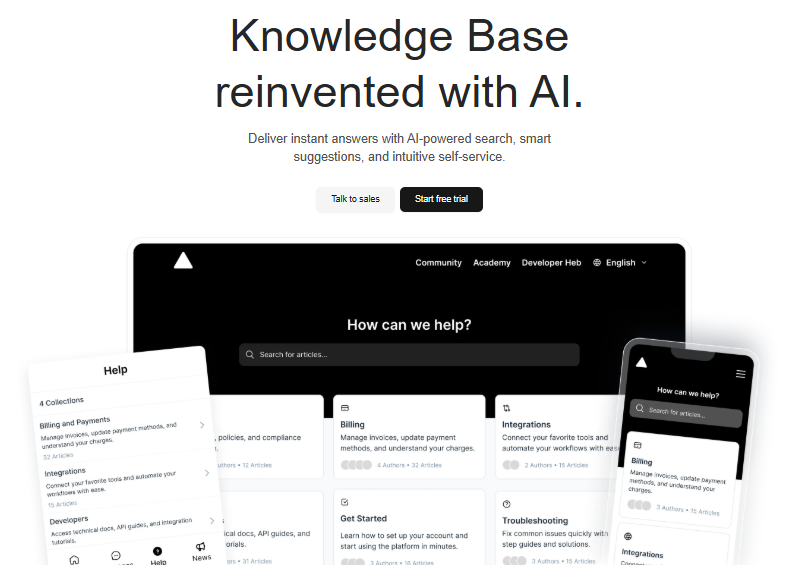
- AI-powered search: Users should find the right answer in seconds, with smart suggestions that anticipate their needs.
- Clean editor: Creating and updating help docs or FAQs should take minutes, not hours.
- Permissions and roles: Some resources are public, while others need to stay internal — good tools let you control visibility easily.
- Analytics: See which articles help most, where users drop off, and how you can improve.
- Integrations: A strong knowledge base plugs into live chat, CRMs, or help desks so support flows without gaps.
Pipeback builds on these essentials with AI-driven recommendations and an all-in-one approach that unifies self-service, chat, automation, and customer tracking, which keeps teams focused and customers satisfied.
Who Uses Knowledge Platforms In A Saas Startup?
Well, well, well - you might be thinking it’s just for the customers. But it’s for more. A good knowledge base ends up serving every corner of a SaaS startup:
- Customers → Instant answers, zero waiting, fewer tickets.
- Support teams → Faster resolutions by linking articles instead of rewriting the same reply.
- Product & engineering → A central spot for release notes, feature updates, and technical docs.
- Sales & success → Smooth hand-offs with onboarding checklists and shared resources.
- New hires → Faster ramp-up with tutorials, company processes, and product knowledge all in one place.
In short, it’s not just a help center, it’s a knowledge backbone that keeps teams aligned and customers happy.
Why SaaS Startups Shouldn’t Wait To Build A Knowledge System
There’s that temptation - wait until we’re bigger, we’ll focus on a help center later. But ask any founder who waited: the longer you put it off, the harder the mess is to clean.
Start early and save yourself headaches.
Getting started doesn’t have to be perfect, or even fully polished. Begin with a handful of repeat questions. Even a basic page with three or four clear articles will help. As you grow, you’ll see patterns- what customers ask, where your team gets tripped up, what features people misunderstand. That’s your cue to improve and expand.
Growth for knowledge solutions isn’t random. Reports from Worldwide Market Reports show that global adoption jumped because remote work and distributed teams require organized self-service. So waiting until “one day” simply isn’t good logic anymore.
How To Make Your Knowledge Hub Easy And Useful
Let’s be honest, not all knowledge portals are great. If people can’t find what they need, or if articles sound robotic and out of touch, they won’t bother coming back. The mission? Make your materials scannable and update them regularly. You may find these tips for building an effective knowledge base practical for your first steps.
Some suggestions for user-friendly support content:
- Break up text with bullet points, images, and headers.
- Add links across related help content - let users bounce from topic to topic if they need more background.
- Keep language simple; write as if you’re explaining features to a new friend instead of a computer expert.
- Update your docs time after time, especially after bug fixes or product changes.
This is why Pipeback doesn’t just stop at storage but also blends in real-time chat, customer journey data, and product update announcements, so everything is connected. Instead of needing two or three tools, your team can get all the help functions in one place. Our competitors offer piecemeal options, but most miss this level of complete integration.
Integrating a Knowledge Base Into Your Website With Pipeback
If you’re looking to integrate a knowledge base into your website, Pipeback makes the process effortless. Instead of clunky add-ons or disconnected help pages, Pipeback embeds directly into your product — giving your customers instant, AI-powered answers without ever leaving your app or site.
Here’s what sets Pipeback apart:
- Smart search that surfaces answers in seconds.
- AI-driven suggestions that anticipate customer needs.
- Seamless embedding so your knowledge base looks and feels like part of your SaaS product.
And because seeing is believing, we’ve created a full video walkthrough where you can watch every feature in action - from setup to customer experience - and get a real feel for how integration looks.
👉 Start your free trial or talk to sales today and see how easy it is to power your SaaS with Pipeback’s knowledge base.
Conclusion
Scaling SaaS without a knowledge base only creates chaos - more tickets, slower teams, and frustrated customers. Pipeback flips that script with AI-powered search, instant answers, and seamless integration directly inside your product.
Don’t wait until support overwhelms your startup. Integrate Pipeback into your website and take your free trial today.
Share this article