 Paulo Castellano
6 Ways a Knowledge Base Reduces SaaS Support Tickets
See how a smart knowledge base cuts SaaS support tickets with instant answers, better onboarding, and smoother customer experiences.
Hey fellow SaaS founders, I’m Paulo Castellano, founder of Pipeback, an AI-powered knowledge base built for SaaS teams that want faster answers, happier customers, and fewer support headaches.
I’ve built a few SaaS products, and as a SaaS customer myself, I’ve noticed one thing that they’re impatient. They don’t care about waiting lists or ticket numbers; they care about getting solutions now. Speed, clarity, and accuracy mean everything to them.
Most would rather find answers online than submit a support ticket. But no one understands your product and the solution of their problem better than you. That’s why a self-service knowledge base is so powerful. It lets customers solve problems instantly without waiting for your support team, and it even helps your agents find information faster when they step in.
In today’s market, that kind of accessibility is essential. Research shows that 86% of customers are more likely to stay loyal to businesses in 2025 that invest in onboarding content that educates and welcomes them post-purchase. When customers feel supported from the start, they stick around.
In this blog, I’ll break down five practical ways an AI-powered knowledge base can cut support tickets, save money, and keep your customers smiling.
Let’s get started.
1. Empowers Customers with Self-Service Solutions
Knowledge bases are becoming increasingly popular. More than 31% of companies already have one, and that number keeps growing. You’ll often find them linked in the header or footer of SaaS websites because users expect quick self-service options.
Just look at brands like Mailchimp or HubSpot. With the size of their user base, imagine the pressure their support teams would face without a knowledge base in place. It would be chaos.
When you add a knowledge base, customers can easily find answers right on your website or app instead of reaching out to support. And with Pipeback, this becomes even more powerful. Its knowledge base integrates directly with an AI-powered chatbot that suggests the most relevant articles in real time complete with direct page links.
This setup encourages users to solve issues themselves, which dramatically reduces support tickets and response times. Some reports show that self-service tools can cut support volume by 30% to 70%, depending on usage and documentation quality.
Even without quoting exact numbers, the impact is obvious. A well-built knowledge base can deflect a huge number of repetitive tickets while giving your customers the instant answers they expect.
2. Offers 24/7 Support Availability for Instant Answers
One of the biggest advantages of having a knowledge base is that it never sleeps. Unlike your support team, it doesn’t clock out at 6 p.m. or take weekends off. It’s always available, ready to help users find answers the moment they need them.
For SaaS companies with customers across time zones, that constant availability is everything. So that if users are facing a setup issue at midnight instead of waiting hours for a response, they can open your knowledge base, search their question, and get back to work instantly. That’s what customers expect today.
With Pipeback, this is built in by design. Its AI-powered knowledge base delivers real-time answers, suggesting the most relevant help articles directly inside the chat window. That means customers get 24/7 support without ever needing to open a ticket. The system even cites the page link, so they know exactly where the information came from.
This kind of always-on support doesn’t just reduce ticket volume but also improve the entire customer experience. When users know they can rely on your platform for quick, accurate help anytime, their trust in your product grows.
3. Preempts “How-To” Queries with Better Onboarding & Documentation
A big chunk of SaaS support tickets comes from simple “How do I…?” questions, especially from new users still learning the ropes. A solid knowledge base tackles this early by giving customers step-by-step guidance from day one.
When your product has clear onboarding guides, setup tutorials, and feature walk-throughs, users can help themselves without waiting on your team. It becomes the first line of support which is always available and always consistent.
The best SaaS companies take this even further by keeping their documentation proactive. Every new feature, update, or recurring issue gets its own quick guide or FAQ. This helps users master your product faster and with more confidence.
To make this work, focus your knowledge base on:
- Getting Started Guides: Quick setup and configuration steps.
- Feature Tutorials: Clear instructions for using core tools.
- Troubleshooting FAQs: Simple fixes for common issues.
If you’re not sure where to start, check out this guide on creating a SaaS knowledge base. It walks you through practical tips and best practices to build one that actually works for both your customers and your support team.
4. Ensures Consistent, Accurate Answers
A knowledge base works as your company’s single source of truth for both customers and your support team. When the right answers live in one place, everyone stays aligned and informed.
For customers, that means fewer questions. If there’s already a clear article explaining billing, integrations, or setup, they can find what they need without contacting support. One solid answer can solve the same problem for hundreds of users.
For your team, it means consistency. When support agents rely on the same knowledge base for guidance, they give uniform, accurate replies that eliminates confusion and reduces follow-up tickets.
Over time, this consistency compounds. When a new question starts coming up often, you can simply document it once and make it accessible to everyone. The next time someone needs that information, it’s already present in your knowledge base and your customer support doesn’t have to answer them.
5. Connects Support, Product, and Documentation
In many SaaS companies, information lives in silos: product updates in one place, documentation in another, and support notes hidden in inboxes. That fragmentation often leads to duplicate work and repetitive questions from users.
A knowledge base brings everything together. It connects your product team, support agents, and documentation in one unified system. When recurring issues appear, support can feed that insight back to the product or documentation team, who can then create or update a help article that solves the problem for everyone permanently.
This closed-loop approach turns one customer’s question into a long-term solution for all future users. Over time, your help center evolves alongside your product, reducing confusion, eliminating repeated questions, and keeping everyone users and staff alike aligned on the same information.
And that’s the real win when knowledge flows freely between teams and customers, your support load naturally decreases. Each update strengthens your documentation, which means fewer people need to ask for help in the first place.
6. Improves Onboarding for New Features and Releases
Every time a new feature rolls out, customers naturally have questions. Without proper documentation, those questions turn into tickets. A proactive knowledge base prevents that by updating guides, tutorials, and FAQs as soon as new features go live.
When users can find clear instructions and quick answers right away, they can explore confidently without waiting for support to explain what’s new. This keeps the post-release ticket surge under control and gives your team more time to focus on genuine technical issues rather than repeated basic queries.
By staying ahead with updated onboarding content, your knowledge base keeps customers informed and your support inbox calm.
Why Choose Pipeback for Your SaaS
As I mentioned earlier in this article, a strong knowledge base can transform how your SaaS handles support and Pipeback takes that even further.
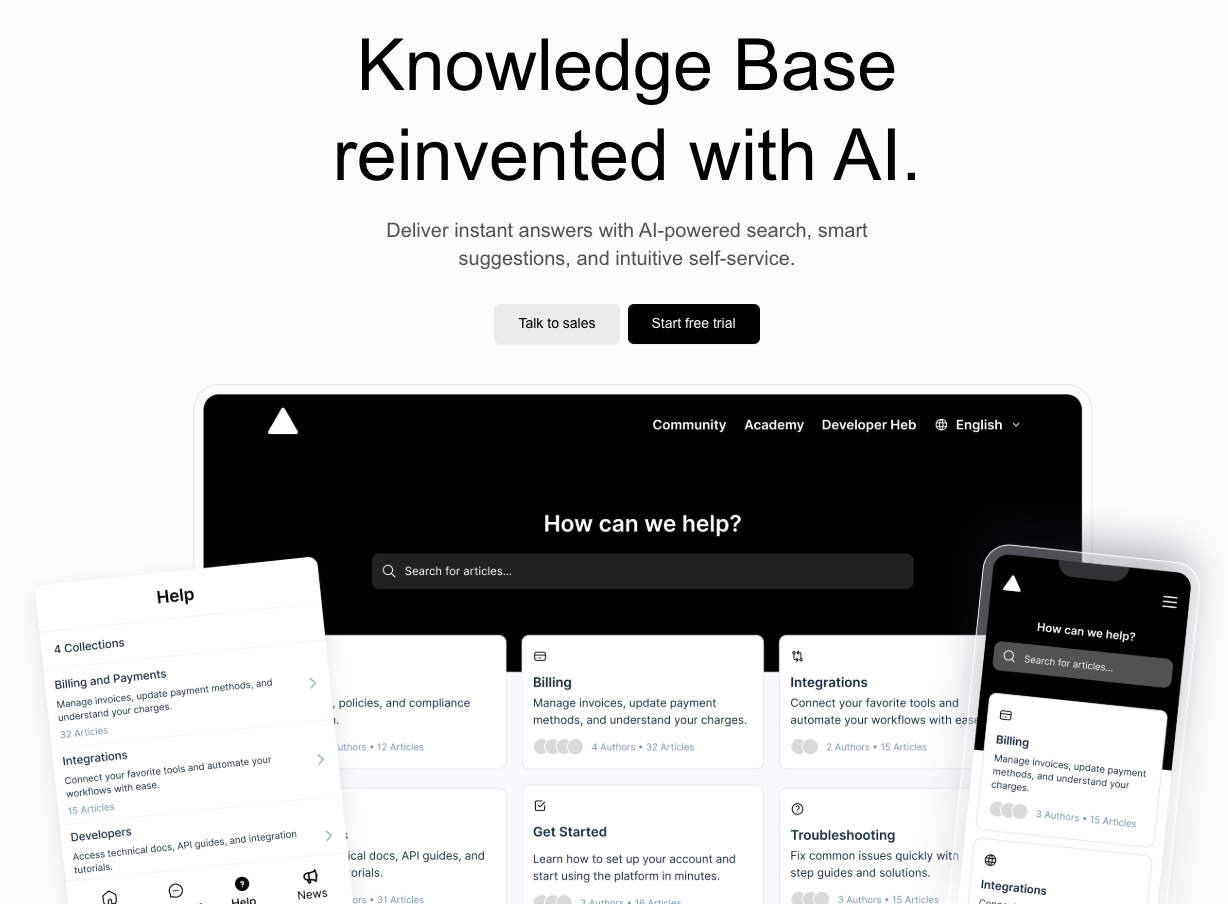
Pipeback’s Knowledge Base is built to give your customers instant answers through smart search, real-time article suggestions, and an AI-powered chatbot that delivers help directly in chat without making customers wait at all. Your users get support whenever they need it, while your team stays focused on the work that actually moves your business forward.
But that’s not all. Pipeback offers much more than just a knowledge base. It’s an all-in-one customer growth platform designed specifically for SaaS companies. From a shared inbox and live chat to CRM, automations, and in-app product updates, all essential for SaaS businesses. It brings all your customer conversations and touchpoints together in one place, so your team can support, engage, and retain users effortlessly.
It also offers multi-language support, custom branding, and powerful reports, so you can see which help articles are performing well and where users get stuck. And if you want to keep your documentation fresh, Pipeback’s built-in editor makes it simple to write, format, and publish clear, helpful content in minutes.
Undoubtedly, Pipeback is a complete system for creating a seamless, self-service support experience that scales with your growth without scaling your ticket volume.
Ready to see how it works? Watch the full walk through below 👇
Conclusion:
Reducing support tickets is about creating a smoother, faster experience for your customers. A well-built knowledge base empowers users, keeps your team efficient, and helps your SaaS scale without stress.
If you’re ready to make that happen, Pipeback gives you everything you need to build it: smart search, instant answers, and a seamless self-service experience your users will love. Start free trial today and be the judge yourself.
Share this article